Multiple Excel Macros or One Unified Tool? A Better Approach to Marketplace Accounting
Introduction
Excel has been one of the most widely used tools for managing business data and accounting operations. Marketplace sellers, accountants and finance teams often use Excel formulas, VBA macros and spreadsheets to process sales reports, calculate marketplace charges and prepare accounting entries.
For businesses operating on a single marketplace with limited transaction volumes, these tools can provide a practical way to automate repetitive tasks.
However, as businesses expand to Amazon, Flipkart, Meesho and other e-commerce platforms, the number of reports and accounting requirements can increase significantly.
Maintaining separate Excel macros and disconnected tools for different marketplaces may eventually become difficult.
This raises an important question for growing online businesses: Should sellers continue maintaining multiple Excel automation tools, or move towards a unified marketplace accounting solution?
Why Excel Macros Are Popular in Marketplace Accounting
Excel offers flexibility and is familiar to many business owners and accounting professionals.
With formulas, Power Query and VBA macros, users can automate several repetitive accounting activities.
Common applications include:
- Importing marketplace CSV and Excel reports.
- Cleaning and formatting transaction data.
- Calculating marketplace fees and deductions.
- Filtering sales and return transactions.
- Preparing accounting voucher information.
- Generating accounting import files.
- Creating reconciliation reports.
Excel automation can be particularly useful when businesses need customised calculations or have specific reporting requirements.
It also allows users to modify their workflows according to their operational needs.
However, the challenge is not necessarily Excel itself. It is the increasing effort required to maintain multiple independent automation processes as business operations expand.
The Challenges of Maintaining Multiple Excel Macros
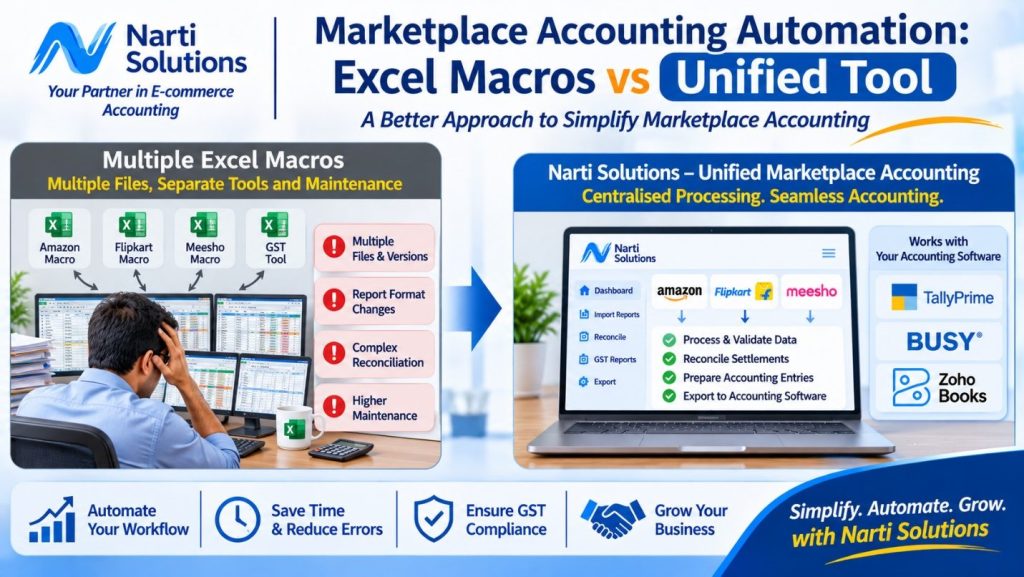
1. Separate Macros for Different Marketplaces
Amazon, Flipkart and Meesho provide reports with different structures and transaction information.
Businesses may need separate VBA procedures to process different report types.
As the number of marketplaces increases, maintaining multiple macros can become complicated.
2. Changes in Marketplace Report Formats
Marketplace report formats and column structures may change over time.
When a macro depends on specific column names, positions or report layouts, changes can require updates to the automation code.
This can create additional maintenance work for the person responsible for the Excel tool.
3. Multiple Versions of Excel Files
When several people work with different copies of accounting macros, maintaining a consistent version becomes difficult.
One person may use an updated file while another continues using an older version.
This can lead to differences in processing results and additional verification requirements.
4. Repeated Data Validation
Even when Excel macros automate calculations, users may still need to check transaction values, settlement differences, returns and tax-related information.
When validation processes are spread across multiple workbooks, reviewing the complete accounting workflow can take additional effort.
5. Accounting Software Integration
Preparing marketplace information for accounting software requires an appropriate output structure.
Businesses using TallyPrime, BUSY or Zoho Books may need different export formats and integration processes.
Maintaining separate Excel tools for different accounting applications can add another layer of complexity.
Multiple Excel Macros vs One Unified Marketplace Accounting Tool
Both approaches have their own advantages. The right choice depends on transaction volume, business requirements and the level of automation needed.
| Area | Multiple Excel Macros | Unified Accounting Tool |
|---|---|---|
| Marketplace processing | Separate macros may be required | Centralised workflow for supported configurations |
| Report handling | Often managed through individual files | Reports processed through one application |
| Maintenance | Multiple macro versions may need updates | Centralised application maintenance |
| Data validation | May be spread across workbooks | Organised validation workflow |
| Accounting integration | Separate export logic may be required | Supported accounting workflows |
| Scalability | Depends on macro design and maintenance | Designed to manage multiple supported configurations |
| Customisation | High flexibility for individual users | Depends on available features and configurations |
Excel remains useful for customised analysis and calculations. A unified application may be more suitable when businesses want to manage several marketplace report-processing workflows in one place.
Introducing Narti Solutions: A Unified Approach to Marketplace Accounting
Narti Solutions focuses on simplifying e-commerce accounting through marketplace report processing, data validation, reconciliation and accounting integration.
The platform is designed to help marketplace sellers, accountants, bookkeepers and CA firms manage supported marketplace report configurations through a centralised application.
Instead of maintaining completely separate Excel macros for every marketplace and accounting workflow, users can explore a unified approach to processing marketplace information.
Narti Solutions is designed to support more than 25 e-commerce platform configurations, subject to the availability of supported report formats and workflows.
It also provides accounting workflows for supported configurations of:
- TallyPrime.
- BUSY.
- Zoho Books.
The objective is to reduce repetitive report preparation and help users organise accounting information more efficiently.
How Narti Solutions Simplifies the Accounting Workflow
The workflow can be understood through four stages.
Step 1: Import Marketplace Reports
Users import the required reports from supported marketplaces.
These reports may include sales, orders, marketplace fees, returns, refunds and settlement information.
Step 2: Process and Validate Data
The system processes the imported information and applies relevant validation checks.
AI-assisted data processing can support data filtering, organisation and identification of potential inconsistencies for further review.
Step 3: Prepare Accounting-Ready Data
After processing and review, the information is organised according to the requirements of the selected accounting workflow.
Step 4: Export to Accounting Software
Users can prepare processed information for supported workflows involving TallyPrime, BUSY and Zoho Books.
The export method and supported transaction coverage depend on the selected accounting application and configuration.
How AI-Assisted Data Processing Adds Value
Traditional Excel macros generally follow predefined formulas, rules and programmed instructions.
AI-assisted data processing offers additional possibilities for organising information and supporting data review.
Within marketplace accounting workflows, it can help with:
- Filtering and organising report information.
- Supporting the identification of potential inconsistencies.
- Preparing data for further validation.
- Reducing repetitive data preparation.
- Supporting more organised accounting workflows.
AI-assisted processing should work alongside validation rules and human review. It should not replace accounting verification or professional judgement.
Who Should Consider a Unified Marketplace Accounting Tool?
Individual Marketplace Sellers
Sellers operating across Amazon, Flipkart, Meesho and other supported platforms may benefit from a centralised approach to report processing.
Growing E-commerce Businesses
Businesses experiencing increasing transaction volumes may want to reduce their dependence on maintaining multiple disconnected spreadsheets.
Accountants and Bookkeepers
Professionals handling several seller accounts can explore more organised marketplace accounting workflows.
Chartered Accountant Firms
CA firms managing multiple e-commerce clients may benefit from a consistent approach to report processing and accounting preparation.
Businesses Using Different Accounting Software
Businesses using TallyPrime, BUSY or Zoho Books can explore supported marketplace accounting workflows while continuing with their existing accounting applications.
Should You Replace Excel Macros Completely?
Not necessarily.
Excel remains a powerful tool for customised calculations, analysis, reporting and specialised business requirements.
The objective of a unified marketplace accounting platform is not to eliminate Excel from business operations. It is to reduce the need to maintain multiple disconnected tools for repetitive marketplace report processing.
Businesses can continue using Excel wherever it adds value while exploring dedicated software for marketplace data processing, reconciliation and accounting integration.
Choosing the right approach depends on the business’s transaction volumes, marketplace requirements, accounting software and internal processes.
Explore a More Organised Marketplace Accounting Workflow
As e-commerce businesses expand, maintaining separate automation tools for every marketplace can create additional operational complexity.
A unified marketplace accounting workflow offers an alternative by bringing report processing, validation, reconciliation and accounting integration together.
Narti Solutions aims to help sellers, accountants, bookkeepers and CA firms simplify these activities through its e-commerce accounting automation solutions.
To explore the available platform features and supported integrations, visit:
Website: https://nartisolutions.com/
Businesses can enquire about a demonstration to understand how the available workflows fit their marketplace and accounting requirements.
About Narti Solutions
Narti Solutions develops software and automation solutions focused on e-commerce accounting, marketplace report processing, settlement reconciliation and accounting integration. Its solutions are designed for marketplace sellers, accountants, bookkeepers and CA firms working with supported e-commerce platforms and accounting applications, including TallyPrime, BUSY and Zoho Books.
Follow Daily Viewer on InstagramBreaking news, explainers and stories in your feed.
Follow